Widget:HtmlImageMap: Difference between revisions
Jump to navigation
Jump to search
No edit summary |
No edit summary |
||
| Line 1: | Line 1: | ||
<noinclude> | <noinclude> | ||
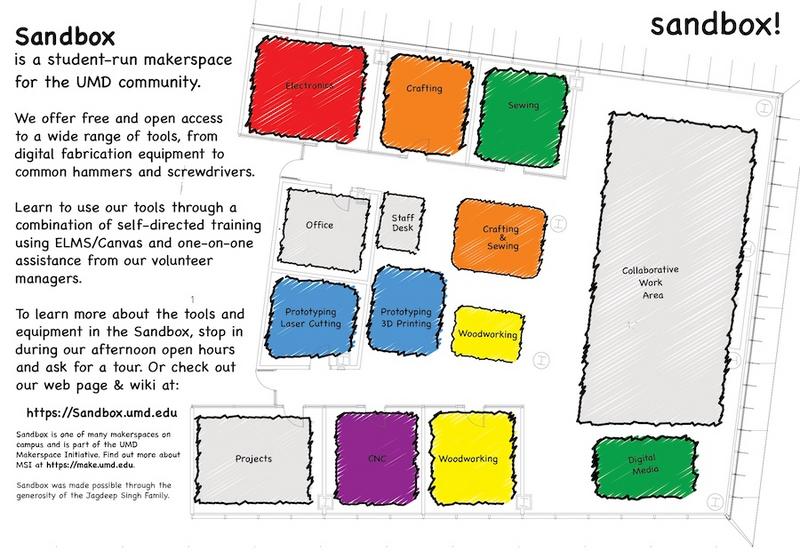
This widget allows you to create | This widget allows you to create an image map by pasting raw HTML area coordinates. | ||
Usage: | Usage: | ||
{{#widget:HtmlImageMap | {{#widget:HtmlImageMap | ||
|image= | |image=YourImageFileName.png | ||
|width= | |width=800 | ||
| | |mapname=sandboxmap | ||
| | |areas= | ||
<area shape="rect" coords="300,80,450,220" href="https://example.com" title="Electronics"> | |||
<area shape="rect" coords="480,110,580,240" href="https://example.com" title="Crafting"> | |||
}} | }} | ||
</noinclude> | </noinclude> | ||
<includeonly> | <includeonly> | ||
<!-- | <!-- Automatically resolves the full path of your wiki file --> | ||
<img src="{$image | <img src="{{canonicalurl:Special:FilePath/{$image}}}" width="{$width|escape:'html'}" usemap="#{$mapname|escape:'html'}" alt="Makerspace Map"> | ||
<map name="{$mapname|escape:'html'}"> | <map name="{$mapname|escape:'html'}"> | ||
{$areas} | |||
{ | |||
</map> | </map> | ||
</includeonly> | </includeonly> | ||
Revision as of 22:54, 13 October 2026
This widget allows you to create an image map by pasting raw HTML area coordinates.
Usage: